On Train, Hotel or Venue Wi-Fi? Here’s What Others Can See on Your Phone

By Dhananjay Arora
You’re travelling to a concert in Leeds and keep losing 4G in the cuttings – luckily there’s Wi-Fi on the train.
After the concert you check into a hotel – the card at reception has the network name and password.
You might also be able to join a network at the venue – often there will be a sign up page where you’re asked to enter an email address.
Is public Wi-Fi safe?
You casually tap join and most of the time it’s perfectly fine – but it’s good to understand both how much (and how little) is visible to whoever owns the network. It’s a lot less than some people fear, and a lot more than many expect.
Can the Wi-Fi owner see what sites you visit on your phone?
Typically, they can see which websites you visit – but not what you actually do on those sites.
Whenever your phone connects to a network, everything it does goes through devices owned by the network owner. These days, nearly all websites feature HTTPS (look for the lock in the URL bar) meaning your activity on the page is encrypted – they won’t be able to see the articles you’re reading, the messages you’re sending or the passwords you enter.
One thing they might be able to see is the name of the website you’re visiting. Before accessing a site (like bbc.co.uk) your phone will need to find its address – by default it does this by querying the network’s own address book (DNS). Furthermore, while the secure connection is being established, the name of the website can appear in plain text. Collectively, this means that the network owner can see what websites and apps you’re accessing – and at what times.
Can the Wi-Fi owner see what you search?
Even what you enter in Google will not be visible as the search itself is encrypted via HTTPS. However, they can still see that you accessed Google – and at what time.
Want to dive deeper into this (and what people can see when using a home network)? Check out our guide to what a Wi-Fi owner can see.
What the network can and can’t see
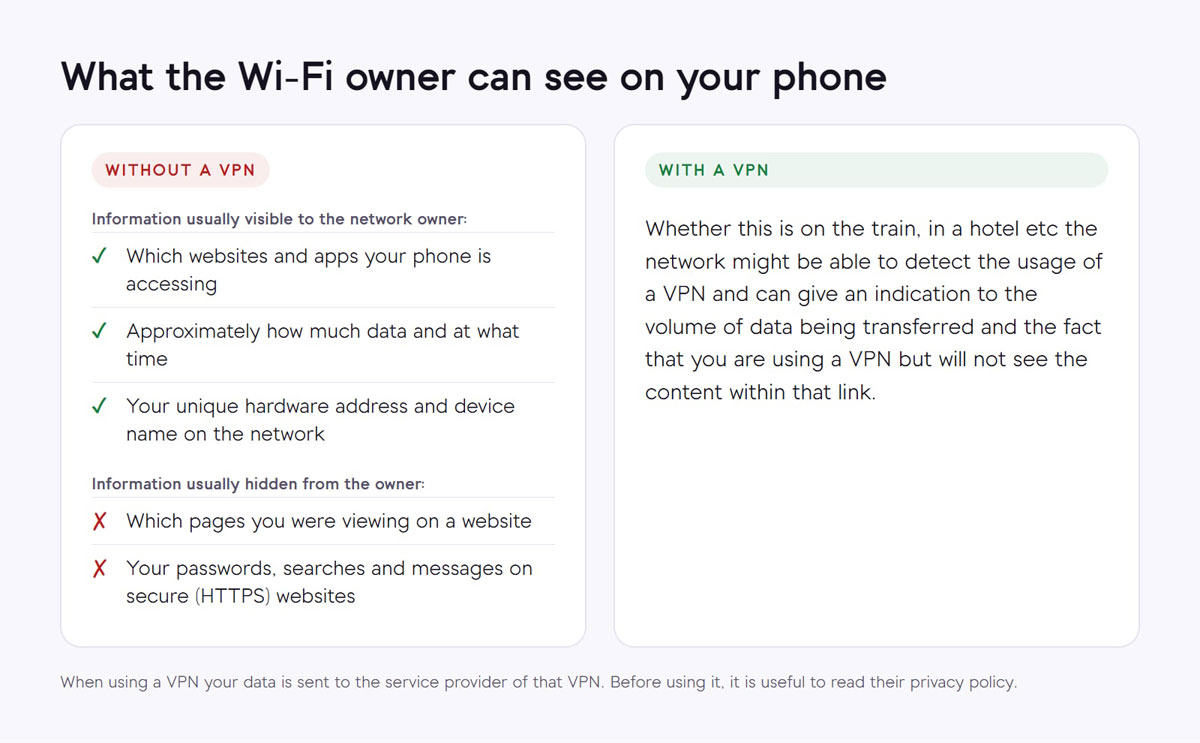
Information usually visible to the network owner:
- Which websites and apps your phone is accessing
- Approximately how much data and at what time
- The hardware address and device name your phone uses on the network
- The name, email address and room number you entered on the sign up form
Information usually hidden from the owner:
- Which pages you were viewing on a website
- Your passwords, searches and messages on secure (HTTPS) websites
- Apart from the website’s name, what you are purchasing or watching
This is also true of apps, as your device can usually be identified as using WhatsApp, Instagram or your preferred bank (as each app connects to its own servers). However, within these apps, information is typically encrypted, meaning only the people in a WhatsApp chat can read its messages for example – not even the train or hotel you booked with. Generally, what reveals you is not the information itself but the pattern: how busy the app was, at what time and which app you used.
Using incognito/private browsing will not alter this as it only stops your device storing this information. It doesn’t change what is visible on the network.
Train, hotel and venue Wi-Fi are not the same

On hotel Wi-Fi, every guest in the building shares the same network.
On hotel Wi-Fi, every guest in the building shares the same network.
They are similar but managed differently.
Train Wi-Fi
Train Wi-Fi is usually operated by a third party for the train company. It is often based on a mobile signal from the track side meaning it can be up and down. Usually you will be asked to accept terms or sign up with an email. This information is linked to your connection. If you are using your own 5G or 4G, this is likely to be more private as it uses your mobile network rather than the train’s.
Is hotel Wi-Fi safe?
Yes, for general internet use. Hotel Wi-Fi is typically one network available to all guests (often logged in with a surname and room number). As this is a shared connection, other guests are likely “closer” to your device compared to at home, so be sure to disable nearby device discovery and file sharing.
Venue Wi-Fi
Venue Wi-Fi (for theatres, stadiums, large outdoor concerts etc.) is designed to handle thousands of devices at once. There may be a sign up form and questions asking you to consent to marketing. Some venues also use Wi-Fi to determine how busy various areas are. Be sure to read what you are agreeing to.
With all three options, the main danger is a spoofed network. One can be titled “Train_WiFi_Free” or “Hotel_Guest” by anyone. If two networks are very similar, ask staff to find out which is genuine.
Where HTTPS, private browsing and a VPN fit
When explaining this to friends in the local pub we tend to talk about three shields and what each one does.
The first is HTTPS. This is the lock found on most websites. The data on the page is encrypted and in many cases this is the bit doing the valuable background work without you even noticing.
Secondly we have private or incognito browsing. People are often surprised that this only stops history being stored on the phone. What the network sees stays as before.
Finally we have a VPN. All data from your phone will be sent over an encrypted link to a server somewhere in the world. Whether this is on the train or in a hotel, the network might be able to detect that you are using a VPN and get an indication of the volume of data being transferred, but it will not see the content within that link.
We also tend to add a disclaimer that a VPN is not a silver bullet. When using a VPN your data is sent to the service provider of that VPN. Before using it, it is useful to read their privacy policy. A VPN won’t stop you typing your password into a fake log in page. On certain networks you may need to clear the registration page in order for the VPN to start. For the longer version (is a VPN worth using or not) refer to this article on the use of VPNs on public Wi-Fi.
How to stop the Wi-Fi owner seeing your history: six habits
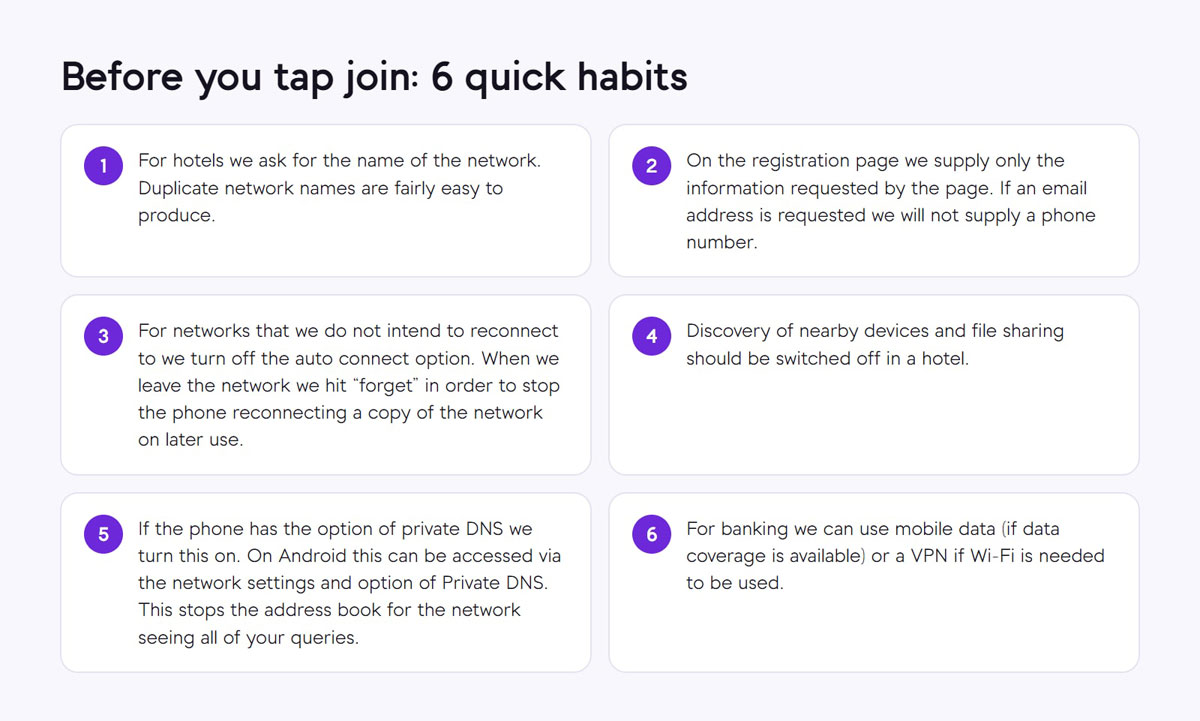
For hotels we ask for the name of the network. Duplicate network names are fairly easy to produce. On the registration page we supply only the information requested by the page. If an email address is requested we will not supply a phone number. For networks that we do not intend to reconnect to we turn off the auto connect option. When we leave the network we hit “forget” in order to stop the phone reconnecting a copy of the network on later use. Discovery of nearby devices and file sharing should be switched off in a hotel. If the phone has the option of private DNS we turn this on. On Android this can be accessed via the network settings and option of Private DNS. This stops the address book for the network seeing all of your queries. For banking we can use mobile data (if data coverage is available) or a VPN if Wi-Fi is the only option.
The short version: fine for everyday use, careful with anything personal
For anything more personal, these practices close most of the gap, and a VPN closes the rest. That gap is why we built Senton VPN.
Dhananjay Arora is Managing Director of Senton UAB, the company behind Senton VPN.