Designing the Ultimate Living Room Cinema Experience
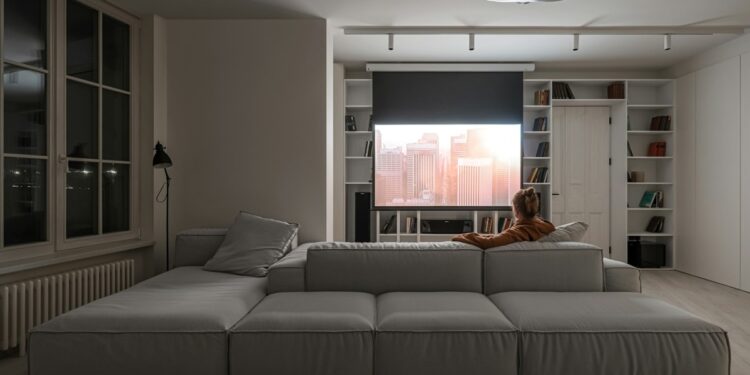
A convincing living room cinema depends on four practical details: controlled light, clear sound, secure installation and a viewing distance that suits the screen. Get those elements right and films feel more immersive without making the room awkward for everyday life. Before buying new furniture or speakers, sketch the layout, note the position of windows and power sockets and check how people normally move through the space. That simple plan can prevent glare, trailing cables and seats that block doorways.
Dial in Ambient Lighting
Start by watching the screen at different times of day. Direct sunlight and bright reflections weaken contrast, so fit lined curtains or adjustable blinds where needed. The best home theatre design ideas use several low-level light sources instead of one bright ceiling fitting.
Place dimmable lamps beside or behind the seating area, where their glow won’t reflect in the screen. A soft bias light behind the display can also reduce eye strain during long films. Choose warm white bulbs around 2,700K for a relaxed effect and group smart bulbs into a preset scene, allowing you to lower every light without leaving the sofa.
Balance Sound and Wall Space
Decide where the screen will sit before arranging speakers, shelves and artwork. A television centred on the main seating position gives dialogue a clear visual anchor, while soft furnishings help control the hollow sound produced by bare floors and large walls. Rugs, curtains and fabric sofas can all reduce distracting echoes. Planning the room around sound quality, screen size and seating can also help create a more immersive home entertainment room.
Leave breathing space around speakers and avoid hiding them inside tightly packed cabinets. If the television combines several components in one heavier unit, professional Sky Glass wall mounting can include checks on the wall, advice on positioning and practical cable planning. This is particularly useful when sockets, shelving or an existing media unit limit your options.
Secure Heavier All-in-One Screens
Check the wall material and the screen’s full weight before drilling. Solid masonry, timber studs and plasterboard each need suitable fixings, and plasterboard alone may not support a heavy display. Use a detector to locate studs and hidden services, then confirm that the bracket matches the television’s mounting pattern and weight rating.
Plan cable routes at the same stage. Power leads shouldn’t be stretched, pinched behind the bracket or run where they create a trip hazard. Leave enough slack for safe connection and future servicing. Useful entertainment space ideas also show how low cabinets and restrained storage can keep equipment accessible without crowding the wall.
Calculate the Best Seating Distance
Measure from the screen to the viewer’s eyes, not to the front edge of the sofa. As a practical starting point for a 4K television, sit roughly 1 to 1.5 times the screen’s diagonal size away. A 55-inch screen therefore works well at about 1.7 to 2.1 metres, though personal comfort still matters.
Screen height deserves equal attention. From your usual seat, the centre should sit close to eye level or only slightly above it. Mark the proposed corners with masking tape, sit down and watch that outline for several minutes. Check the view from secondary chairs too. If you find yourself lifting your chin or turning your head, adjust the position before installation begins.
The final test should use the content you watch most. Try a dialogue-heavy programme, a dark film and a fast sporting event, then fine-tune the lamp levels, sound settings and sofa position. Once faces look natural, speech stays clear and the screen fills your view comfortably, the room is ready for its first proper film night.